
This post contains affiliate links. If you purchase through these links, sudostack may earn a small commission at no extra cost to you. This helps support the site.
Running open-source LLMs locally means picking hardware that won't choke on a 7B model mid-conversation. This guide covers six mini PCs across three budget tiers, ranked by how well they actually handle inference workloads, not just how good their spec sheets look on paper. Whether you're spinning up Ollama for the first time or building a dedicated home inference server, here's where to spend your money.
Quick Picks
What to Look for in a Mini PC for Local LLM Inference
Local inference has one hard constraint: RAM is your model's working memory. There's no swap, no magic, no workaround. A 7B model at 4-bit quantization needs around 4-5GB of RAM just to load, and that number climbs fast as you move to 13B or 30B. The practical floor for running anything useful is 16GB. Eight gigabytes will technically load a small quantized 3B model, but you'll be fighting the OS for headroom the entire time.
After RAM, the biggest split in this price range is between Intel N95 machines and AMD Ryzen 5/7/9 options. The N95 is a 4-core, 4-thread chip built for thin clients and low-power office work. It'll run llama.cpp or ollama, but inference on anything larger than a 7B model will be painfully slow. Ryzen 5000 and 7000 series chips bring 6-8 cores and significantly better per-core throughput, which translates directly into tokens per second.
A few other things to watch:
- Integrated GPU: The AMD Radeon 780M (on Ryzen 7000 series) can offload layers to GPU memory and accelerate inference in
llama.cpp. Intel's integrated graphics provide much less benefit for this workload. - RAM type: DDR5 and LPDDR5 have higher memory bandwidth than DDR4, which helps throughput on large models. The delta isn't massive, but it's real.
- Storage: 256GB sounds fine until you have three model variants sitting on disk. A 1TB SSD is the minimum for building any kind of model library.
- Thermals: If you're running inference continuously, sustained CPU temperatures matter. Beelink and GEEKOM both have decent thermal designs in this price range, but don't expect silent operation under load.
On budget expectations: the roughly $500 ceiling in this guide is real but it costs you something. Under around $500, you're giving up dedicated GPU acceleration, DDR5 RAM, and 1TB storage in most configs. Plan to run everything at 4-bit or 3-bit quantization. If you can stretch to around $700, the GEEKOM A7 MAX changes the math considerably.
Beelink SER5 Pro Mini PC

Beelink SER5 Pro Mini PC
Pros
- 6-core Ryzen handles 7B-13B quantized models well
- 16GB DDR4 is the right floor for practical inference
- WiFi 6 and 2.5G LAN for network-attached use
- Triple display output
- Strong user ratings (4.4/5 across 232 reviews)
Cons
- DDR4 RAM, not DDR5
- 500GB storage fills up fast with multiple models
- No GPU acceleration worth counting on
- Ryzen 5000 series is two generations old
The SER5 Pro hits the sweet spot for local LLM inference under around $500. Six cores and 12 threads mean llama.cpp and ollama can actually parallelize work effectively, and the 16GB DDR4 is enough to run 4-bit quantized 13B models without constantly swapping. You won't get blistering tokens-per-second throughput, but you'll get usable performance for personal inference tasks, agent workflows, and home automation where a cloud API feels like overkill.
The 500GB SSD is the real limitation here. If you plan to keep more than two or three model variants on hand, you'll run out of space. Swapping in a larger M.2 drive is possible, but it adds cost and a bit of DIY friction. On the RAM front, DDR4 versus DDR5 matters at the margins for inference bandwidth, but it won't make or break the experience at 7-13B scales.
Buy the SER5 Pro if you're building your first local inference box and want to stay under roughly $500. It's the strongest CPU in this price tier, the 16GB RAM configuration is correct, and Beelink has a decent track record for firmware support and build quality. Skip it if you already know you'll be running 30B models or larger, in which case you need to look higher up the stack.
GMKtec NucBox G3S
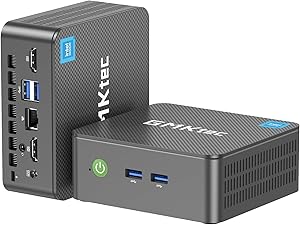
GMKtec NucBox G3S
Pros
- Lowest price in the lineup at around $240
- Compact form factor
- Dual 4K HDMI outputs
- High purchase velocity (300+ units sold/month on Amazon)
Cons
- 4-core N95 is genuinely slow for LLM inference
- 8GB RAM barely fits a quantized 7B model
- 256GB storage is nearly unusable for model collection
- Will struggle with anything above 3-7B parameters
- No GPU acceleration
The NucBox G3S is cheap, and that's the entire argument for it. The Intel N95 is a thin-client chip, not an inference chip. Four cores and 8GB of RAM means you're running the smallest quantized models you can find, accepting token rates that feel more like reading than conversation, and constantly managing storage because 256GB evaporates when model files run 4-8GB each.
There's one real use case for this machine: you want to confirm that local inference works on your network, you want to run phi-3-mini or another small 3B model as a lightweight assistant, and you are not spending more than around $250 under any circumstances. For that narrow scenario, it does the job.
For anyone who wants to actually run Llama 3.1 8B, Mistral 7B, or anything in the 7B family at a pace you'd call acceptable, skip this and spend the extra roughly $200 on the SER5 Pro. The N95's limitations aren't theoretical. They show up immediately when you try to run inference on a model that needs real CPU throughput.
Beelink MINI S12
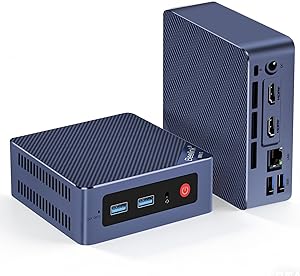
Beelink MINI S12
Pros
- 12GB RAM more practical than 8GB for quantized 7B models
- 2.5G LAN for faster network-attached use
- Reasonable user reviews (3.8/5 stars)
Cons
- Same 4-core N95 CPU as the cheaper G3S
- 256GB storage still very limiting
- Only around $140 less than the much better SER5 Pro
- No GPU acceleration
The MINI S12 sits in an awkward position. It's better than the NucBox G3S in one meaningful way: 12GB of RAM is more headroom for a quantized 7B model. The 2.5G LAN is also a nice touch if you're pulling models over the network. But you're still stuck with the same 4-core N95 chip, which is the actual bottleneck for inference speed.
The math here doesn't work in its favor. At around $299, it's only about $140 cheaper than the SER5 Pro, which gives you 6 cores, faster single-core performance, and much better overall throughput. That gap is the difference between a machine that handles 7B models acceptably and one that struggles with them.
The MINI S12 makes sense if you're already inside the Beelink ecosystem, you need 2.5G LAN specifically, and around $299 is genuinely your hard ceiling. Otherwise, save for the SER5 Pro or go even cheaper with the NucBox G3S. The middle ground it occupies isn't a very useful one for this workload.
GEEKOM Mini PC AI A7 MAX

GEEKOM Mini PC AI A7 MAX
Pros
- 8-core Ryzen 9 with 5.2 GHz boost is the fastest CPU in this roundup at its price
- Radeon 780M enables GPU layer offloading in llama.cpp
- DDR5 RAM with better bandwidth than DDR4
- 1TB storage for a real model library
- Strong purchase volume and ratings (4.3/5 across 407 reviews)
Cons
- Runs roughly $200 over the $500 target
- Radeon 780M helps but isn't close to discrete GPU performance
- Mobile chip, not a workstation processor
If you can stretch past around $500, the GEEKOM A7 MAX is where the performance curve bends upward meaningfully. The Ryzen 9 7940HS is an 8-core, 16-thread chip with a 5.2 GHz boost clock, and paired with DDR5 RAM, it handles 13B models at 4-bit quantization with noticeably better token throughput than the SER5 Pro's Ryzen 5. The 1TB SSD also means you can actually keep a model library without constant housekeeping.
The Radeon 780M is the other differentiator. With llama.cpp's Vulkan or ROCm backend, you can offload model layers to the iGPU's VRAM, which reduces CPU pressure and can improve throughput on some model sizes. The exact speedup varies by model and configuration, so treat this as a meaningful bonus rather than a guaranteed multiplier. Community reports suggest it's a real improvement over pure CPU inference, but it's not RTX-level acceleration.
Buy this if you're running inference regularly, you want to push into 13B-30B quantized territory, or you're using this as a lightweight inference server for multiple users. At roughly $200 over the SER5 Pro, the performance delta justifies the cost if local inference is something you use daily rather than occasionally.
Lenovo ThinkCentre neo 50q Gen 4

Lenovo ThinkCentre neo 50q Gen 4
Pros
- Enterprise build quality and Lenovo support infrastructure
- 8-core Intel i5-13420H competitive for general workloads
- Good choice if this machine doubles as a work desktop
- Consistent 4.3/5 star ratings across configurations
Cons
- DDR4 RAM at around $700 is a tough pill when GEEKOM offers DDR5 at the same price
- No Radeon 780M equivalent for GPU-assisted inference
- 512GB storage tighter than GEEKOM's 1TB
- Intel iGPU provides minimal inference acceleration
The ThinkCentre neo 50q is a solid machine making a case that doesn't quite work for pure inference workloads. At around $700 for the 16GB config, you're getting Lenovo's build quality, enterprise support options, and a respectable 8-core Intel i5-13420H. It's a legitimate desktop replacement. But when you compare it directly to the GEEKOM A7 MAX at the same price point, it loses on almost every spec that matters for LLM inference: DDR4 versus DDR5, no GPU layer offloading, and 512GB versus 1TB storage.
Where it makes sense is the dual-purpose scenario. If you need a machine that handles your actual work during the day and runs ollama in the background or evenings, Lenovo's build quality and warranty support are real advantages that a consumer mini PC from Beelink or GEEKOM can't match. IT departments and corporate procurement also find ThinkCentre machines easier to justify and support.
For a dedicated local inference box, the GEEKOM A7 MAX beats it at the same price. For a work machine that also handles 7-13B model inference as a secondary task, the ThinkCentre is a reasonable pick, especially if you're buying through enterprise channels or need warranty support.
Beelink SER8 Mini PC

Beelink SER8 Mini PC
Pros
- 32GB DDR5 opens up 30B quantized model territory
- Zen 5 architecture is the newest and fastest CPU in this roundup
- 1TB PCIe 4.0 SSD for fast model loading
- USB4 and triple display output
Cons
- Significantly exceeds the roughly $500 target at around $889
- Minimal review data at time of research (very new release)
- Serious premium for gains that matter mainly at 30B+ model sizes
The SER8 is the top of this stack by a clear margin. The Ryzen 7 8745HS is a Zen 5 APU, which means newer architecture, better IPC, and stronger integrated graphics than the Ryzen 7000 series in the GEEKOM. More importantly, 32GB of DDR5 RAM is what unlocks 30B quantized models. Running a Q4_K_M quantized 70B model requires roughly 40GB of RAM, which exceeds this machine's capacity, so 70B inference would require extreme quantization (Q2 or lower) with significant quality tradeoffs. At 32GB, 30B models at comfortable quantization levels are the practical ceiling.
The caveat is price and review maturity. At around $889, this machine was very new at the time of this research, with minimal user review data to validate real-world reliability. The specs are strong on paper, and Beelink has a reasonable track record, but buying a brand-new SKU with two reviews carries more risk than established models like the SER5 Pro or GEEKOM A7 MAX.
Buy the SER8 if 30B inference is your actual target, you understand you're paying a significant premium for that capability, and you're comfortable being an early adopter. If you're primarily running 7-13B models, the jump from the GEEKOM A7 MAX to the SER8 doesn't justify nearly $200 in additional cost.
How They Compare
| Product | Price | CPU (Cores/Threads) | RAM | Storage | Best For |
|---|---|---|---|---|---|
| Beelink SER5 Pro ★ | ~$439 | Ryzen 5 5625U (6C/12T) | 16GB DDR4 | 500GB | Best overall under ~$500 |
| GMKtec NucBox G3S | ~$240 | Intel N95 (4C/4T) | 8GB DDR4 | 256GB | Extreme budget, 3B models only |
| Beelink MINI S12 | ~$299 | Intel N95 (4C/4T) | 12GB LPDDR4 | 256GB | Budget with slightly more RAM headroom |
| GEEKOM A7 MAX | ~$699 | Ryzen 9 7940HS (8C/16T) | 16GB DDR5 | 1TB | Best performance per dollar overall |
| Lenovo ThinkCentre neo 50q Gen 4 | ~$700 | Intel i5-13420H (8C/12T) | 16GB DDR4 | 512GB | Dual-purpose work + inference machine |
| Beelink SER8 | ~$889 | Ryzen 7 8745HS (8C/16T, Zen 5) | 32GB DDR5 | 1TB PCIe 4.0 | 30B models, maximum performance |
Bottom Line
If you're staying under roughly $500, the Beelink SER5 Pro is the correct answer. Six cores, 16GB of RAM, and WiFi 6 at around $439 gives you a machine that handles quantized 7-13B models without constant frustration, and it's a known quantity with real user data behind it. The N95 machines are too slow for serious inference work, and the savings don't compensate for the patience tax.
If you can go to around $700, skip the ThinkCentre and buy the GEEKOM A7 MAX instead. You get DDR5, a Ryzen 9 with Radeon 780M GPU acceleration, and 1TB of storage. That's a materially better inference machine at the same price. Save the ThinkCentre recommendation for someone whose primary need is a reliable business desktop that can also run local models as a side task.