
This post contains affiliate links. If you purchase through these links, sudostack may earn a small commission at no extra cost to you. This helps support the site.
The sub-$300 FDM printer market in 2026 is genuinely good. Auto-leveling, direct-drive extruders, and CoreXY structures are no longer premium features. They're table stakes. This guide covers seven printers from around $186 to $300 and tells you which one to buy based on what you actually plan to print.
Quick Picks
What to Look For
Before you filter by price, nail down what you're actually printing. Most frustration with budget printers comes from buying the wrong machine, not a bad machine.
Print speed matters more than you think. The range in this category is wide: 250mm/s on the slow end, 600mm/s on the fast end. A printer running at 250mm/s will take roughly 2.4x longer to finish the same job as a 600mm/s machine. If you're printing frequently or running overnight jobs, that gap adds up fast.
Nozzle temperature determines your material options. 260-280°C covers PLA and PETG, which is fine for most hobbyist work. If you want to print nylon, carbon fiber composites, or anything engineering-grade, you need 300°C or higher. Only two printers in this guide hit that threshold: the ELEGOO Centauri Carbon (320°C) and the Creality K2 SE (300°C).
A few other factors worth getting right before you buy:
- Build volume: 220 x 220mm is the standard floor. The Anycubic Kobra X and ELEGOO Centauri Carbon go wider at 260mm and 256mm respectively. Know your largest planned print before committing.
- Auto-leveling type: CR Touch (capacitive) is reliable but can be finicky. Inductive sensors are generally more consistent. All seven printers here include some form of auto-leveling, so this is more about reliability than presence.
- Assembly time: Kit printers can take 3-6 hours. The Entina TINA2S and Bambu Lab A1 mini ship essentially ready to run. Factor your time into the true cost.
- Multicolor: Native multicolor adds complexity and requires managing purge towers and filament changes. If you just want clean single-color prints, skip it. If you want to print multi-material models out of the box, it's worth paying for.
Common mistakes: Don't chase the lowest price without checking speed. Don't assume a 300°C nozzle means printable carbon fiber without also having an enclosure and heated bed. And don't underestimate how much a large community (Creality, specifically) matters when something goes wrong at 2am.
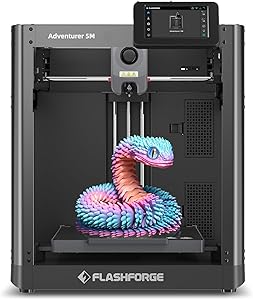
FLASHFORGE Adventurer 5M
FLASHFORGE Adventurer 5M
Pros
- 600mm/s is the fastest in this price range
- CoreXY structure delivers cleaner geometry at speed
- Fully automatic leveling and calibration
- Quick-swap nozzle for easy maintenance
- Dual-sided PEI build plate included
Cons
- 280°C nozzle cap means no nylon or carbon fiber
- 220 x 220mm build volume is on the smaller side
- Not ideal if multicolor printing is on your roadmap
At around $239, the Adventurer 5M hits the best combination of speed, build quality, and ease of use in this entire category. 600mm/s is the ceiling for sub-$300 printers right now, and FLASHFORGE gets there with a CoreXY frame that keeps print quality tight even at high velocity. This isn't a machine that sacrifices accuracy for speed. The all-metal construction and auto-calibration system handle that tension well.
The quick-swap nozzle is a practical win. Nozzle clogs are inevitable with FDM printing, and being able to swap in 30 seconds rather than disassembling a hot end is a quality-of-life upgrade that matters on the tenth hour of a print farm run. The dual-sided PEI plate handles first-layer adhesion well across PLA and PETG without needing glue stick rituals.
The 280°C nozzle limit is the one real constraint. You're locked to PLA, PETG, and similar materials. Anything requiring higher temps is off the table. If your plans include engineering filaments down the road, look at the ELEGOO Centauri Carbon instead. But if PLA and PETG cover your use case (and they cover most hobbyist use cases), the Adventurer 5M is the clear pick at this price.
Creality Ender 3 V3 SE

Creality Ender 3 V3 SE
Pros
- Lowest price in this guide at around $186
- Largest community and parts ecosystem of any printer here
- Dual Z-axis for stable, consistent prints
- Auto filament loading and resume printing
- 26K+ reviews across listings, heavily real-world tested
Cons
- 250mm/s is significantly slower than the competition
- 260°C nozzle is the most restrictive in this group
- Older Cartesian design compared to CoreXY alternatives
The Ender 3 V3 SE serves a different buyer than the other printers in this guide. Not because it's worse, but because it's built for a different purpose. At around $186, it's the cheapest machine here by a meaningful margin, and it comes with the most important advantage a beginner can have: an enormous community. If something breaks, someone on Reddit or YouTube has already fixed it and filmed it.
The 250mm/s speed ceiling is the honest tradeoff. Compared to the Adventurer 5M at 600mm/s, you're looking at prints that take more than twice as long. For someone printing one or two objects a week to learn the hobby, that's fine. For anyone running a small side business or prototype-testing workflows, it becomes a real bottleneck. The CR Touch auto-leveling is solid and the Sprite direct extruder handles flexible filaments better than Bowden setups.
Buy this if you're new to FDM printing and want to learn without spending around $239 or more. Buy something else if time matters and you're past the learning curve.
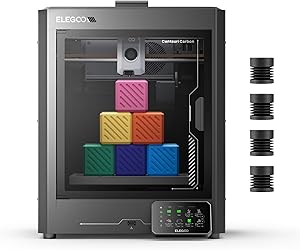
ELEGOO Centauri Carbon
ELEGOO Centauri Carbon
Pros
- 320°C nozzle unlocks nylon, carbon fiber, and engineering filaments
- Largest build volume in this guide at 256 x 256 x 256mm
- Built-in camera for remote print monitoring
- CoreXY structure at a competitive price point
- Ready to print out of the box
Cons
- Promotional price of around $300 may not last; typical price is around $360
- 500mm/s is fast but trails the Adventurer 5M by 100mm/s
- Smaller community than Creality for troubleshooting
The Centauri Carbon is the pick if your filament plans go beyond PLA and PETG. A 320°C max nozzle temperature is meaningfully different from the 260-280°C ceiling on most printers in this range. It opens the door to nylon, carbon fiber composites, and higher-performance materials that would jam or degrade in a lower-temp hot end. Pair that with the largest build volume in this guide (256 x 256 x 256mm) and you have a machine that scales with more demanding projects.
The built-in camera is a practical bonus that other printers at this price don't include. Being able to check on a 10-hour print from your phone without walking to the printer is genuinely useful, not just a spec sheet bullet point. Setup is quick. ELEGOO ships it ready to print without significant assembly.
The one thing to flag: at time of writing, this is on promotion at around $300 from a typical price of around $360. If that promotion has ended by the time you're reading this, the value calculation shifts. At around $360, the Adventurer 5M at around $239 becomes a harder comparison unless you specifically need high-temperature material support. Check current pricing before committing.
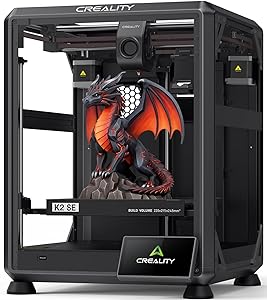
Creality K2 SE
Creality K2 SE
Pros
- Multicolor printing via CFS system at around $299
- 300°C nozzle handles a wider material range
- Solid metal construction with vibration control
- Quick-swap nozzle for easy maintenance
- 1.6K+ reviews at 4.0 stars, well tested in the wild
Cons
- Multicolor adds system complexity vs single-color setups
- 500mm/s trails the Adventurer 5M by 100mm/s at a higher price
- Build volume is the smallest among the printers in the $299 range
The K2 SE makes sense for one specific buyer: someone who wants multicolor printing and trusts the Creality ecosystem. The CFS (Color Filament System) brings multi-material capability to a machine priced at around $299, which is legitimately impressive. You also get a 300°C nozzle, which widens your material options past what most printers in this range allow.
The tradeoff against the Adventurer 5M is real: the K2 SE costs around $60 more, prints 100mm/s slower, and has a slightly smaller build volume. What you're paying for is the multicolor system and the Creality brand, which matters if you want easy access to replacement parts, a massive modding community, and slicer support refined by millions of users.
If multicolor is on your list and you want the security of the largest 3D printer community in the world behind your machine, this is the right call. If you're single-color only, the Adventurer 5M is faster and cheaper.
Anycubic Kobra X

Anycubic Kobra X
Pros
- Native 4-color printing, expandable to 19 colors
- 600mm/s speed matches the fastest printer in this guide
- Largest build volume among multicolor options (260 x 260 x 260mm)
- 45dB quiet operation, noticeably quieter than most competitors
- AI camera and hardened steel nozzle included
Cons
- Only 28 reviews at time of writing, limited real-world data
- Promotional price (around $300 from around $460) may not hold
- Max nozzle temp not confirmed in available specs
- Smaller ecosystem than Creality for parts and mods
On paper, the Kobra X is the most impressive multicolor machine at this price. Native 4-color printing, 600mm/s speed, a 260 x 260 x 260mm build volume, and 45dB noise levels. That's a spec sheet that would have cost considerably more two years ago. The Amazon's Choice designation and the promotional price dropping it from around $460 to around $300 make it look like a standout deal.
The catch is review count. At time of writing, the Kobra X has only 28 user reviews on Amazon. That's not enough data to trust the product in the same way you'd trust the Ender 3 V3 SE (26,000+ reviews) or even the Adventurer 5M (2,000+ reviews). Anycubic is a legitimate brand with real products, but new listings with thin review counts carry meaningful risk. You won't have a community to fall back on if something goes sideways.
If the promotional pricing holds and Anycubic's support proves reliable, this could be the best multicolor value in the category. But right now, with limited real-world feedback and pricing that could revert to around $460, it's a calculated risk. Early adopters with some tolerance for troubleshooting will likely love it. Everyone else should wait 6 months for the review count to build.
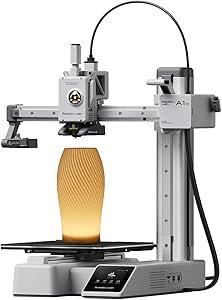
Bambu Lab A1 mini
Bambu Lab A1 mini
Pros
- Bambu Lab fit and finish is noticeably ahead of budget brands
- 20-minute setup, fastest out-of-box experience in this guide
- Full auto-calibration with active flow rate compensation
- Quiet operation at 48dB or below
- Premium brand with strong software and firmware support
Cons
- Build volume and detailed speed specs not confirmed in available data
- Ties into the Bambu Lab cloud ecosystem, which adds dependency
- Smaller community than Creality for mods and third-party fixes
Bambu Lab earns its reputation. The A1 mini is the entry point to the Bambu ecosystem, and what you're buying at around $239 is a premium out-of-box experience: 20-minute setup, auto-calibration that actually works without fiddling, and software that's ahead of what Creality and FLASHFORGE ship. The active flow rate compensation is a feature you'll appreciate when printing at speed. It adjusts extrusion in real time to compensate for pressure changes in the hot end.
The honest limitation here is that build volume and exact speed specs weren't available in the source data used for this guide. We know it's a high-speed machine with premium internals, but if exact dimensions or mm/s benchmarks are critical to your decision, verify those directly on the Bambu Lab product page before buying. The cloud dependency is also worth noting: Bambu Lab's software is excellent but tightly integrated with their ecosystem, which some users prefer to avoid.
If you value a smooth, low-frustration experience over raw specs per dollar, and you're open to the Bambu ecosystem, this is a worthy spend at around $239. Just know that the Adventurer 5M gives you confirmed specs and 600mm/s speed at the same price.
Entina TINA2S
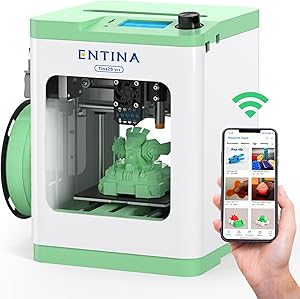
Entina TINA2S
Pros
- Zero assembly required, plug in and print
- WiFi cloud printing built in
- 4.3 stars across 357 reviews, satisfied users
- Affordable at around $190
Cons
- Build volume and speed specs not publicly documented
- Mini printer category, not for full-scale FDM projects
- Less established brand with limited ecosystem
- Not the right tool if you're serious about the hobby
The TINA2S lands in a different category than everything else in this guide. It's a mini printer aimed at complete beginners and younger users who want WiFi-enabled, zero-assembly printing without having to care about specs. At around $190, it's fully assembled, connects to the cloud, and auto-levels on its own. The 4.3-star rating across 357 reviews suggests the people buying it for that purpose are happy.
If you're reading a buying guide and comparing nozzle temperatures and build volumes, this isn't for you. It's a gift printer, a first printer for a kid, or a low-stakes way to try FDM printing without any commitment to the hobby. For anyone serious about making things, the Ender 3 V3 SE at a similar price gives you a real machine with real specs and a massive community behind it.
How They Compare
| Product | Price | Max Speed | Max Nozzle Temp | Build Volume | Best For |
|---|---|---|---|---|---|
| FLASHFORGE Adventurer 5M ★ | ~$239 | 600mm/s | 280°C | 220 x 220 x 220mm | Overall best |
| Creality Ender 3 V3 SE | ~$186 | 250mm/s | 260°C | 220 x 220 x 270mm | Budget beginners |
| ELEGOO Centauri Carbon | ~$300 (promo) | 500mm/s | 320°C | 256 x 256 x 256mm | Advanced materials |
| Creality K2 SE | ~$299 | 500mm/s | 300°C | 220 x 215 x 245mm | Multicolor (Creality ecosystem) |
| Anycubic Kobra X | ~$300 (promo) | 600mm/s | Not confirmed | 260 x 260 x 260mm | Multicolor value (if promo holds) |
| Bambu Lab A1 mini | ~$239 | Not confirmed | Not confirmed | Not confirmed | Premium ease of use |
| Entina TINA2S | ~$190 | Not specified | Not specified | Not specified | Kids and beginners |
Bottom Line
For most makers, the FLASHFORGE Adventurer 5M at around $239 is the right answer: 600mm/s speed, CoreXY precision, auto-leveling, and a quick-swap nozzle at a price that doesn't require justification. If you're brand new and around $186 sounds better than around $239, start with the Ender 3 V3 SE and upgrade when you know what you actually need. And if carbon fiber or nylon is on your material list, spend the extra money and get the ELEGOO Centauri Carbon's 320°C nozzle. You won't regret it when your PLA-limited neighbors can't print what you can.