
This post contains affiliate links. If you purchase through these links, sudostack may earn a small commission at no extra cost to you. This helps support the site.
If you're running Stable Diffusion locally, the GPU you pick determines everything: how fast you generate, how many LoRAs you can stack, whether you can batch at all, and whether your PSU survives the process. This guide covers seven cards across every budget tier, from hobby builds under ~$350 to production-grade rigs pushing ~$1,400. NVIDIA dominates this space for good reason, but AMD has a compelling argument if VRAM capacity is your constraint.
Quick Picks
What to Look For
VRAM is the single most important spec for Stable Diffusion. At 8 GB, you can run base models and stack one or two LoRAs before hitting OOM errors. At 12 GB, most enthusiast workflows fit comfortably: multiple LoRAs, ControlNet, high-res fix, all without constant memory management headaches. At 16+ GB, you unlock batch generation, 4K outputs, and complex multi-adapter pipelines.
Memory bandwidth matters almost as much as capacity. Bandwidth determines how fast data moves between VRAM and the compute cores during inference, which drives your steps-per-second number. Aim for 400+ GB/s if throughput is a priority. Raw shader or CUDA core count matters less than you'd think for this workload; VRAM and bandwidth are the real bottlenecks at typical resolutions.
Software ecosystem is where NVIDIA pulls ahead of everyone. CUDA is the foundation for PyTorch, ComfyUI, AUTOMATIC1111, and virtually every SD-adjacent tool. AMD's ROCm stack has improved but still lags in driver stability and out-of-the-box compatibility. Intel's OneAPI is nascent enough that you should only consider it if you're comfortable debugging driver issues and missing optimizations.
A few common mistakes to avoid:
- Buying the RTX 4060 Ti for production batch work. 8 GB VRAM will bottleneck you constantly.
- Switching to AMD purely for the VRAM number without testing ROCm stability on your specific workflow first.
- Skipping PSU headroom checks. High-end GPUs need 850W+ supplies; the RX 7900 XT pulls 420W under load alone.
- Assuming RTX 50-series is right around the corner. The RTX 40-series will stay dominant through 2026.
- Overbuying the RTX 4080 Super when the RTX 4070 Ti handles 95% of workflows for hundreds less.
Budget expectations: under ~$400 is hobby territory, ~$550 to ~$850 is the enthusiast sweet spot, and ~$1,200 and up is for production workloads where generation speed has a real cost.
NVIDIA GeForce RTX 4080 Super
NVIDIA GeForce RTX 4080 Super
Pros
- Highest performance for Stable Diffusion and large batch inference
- 16 GB VRAM handles 4K generation and complex multi-LoRA scenarios
- 576 GB/s bandwidth matches AMD's highest-VRAM option
- 8th-gen NVENC for real-time video synthesis workflows
Cons
- 320W power draw requires robust cooling and 850W+ PSU
- Diminishing returns vs RTX 4070 Ti for most workflows
- Limited stock; many AIB variants discontinued
- Overkill for single-image generation or hobby use
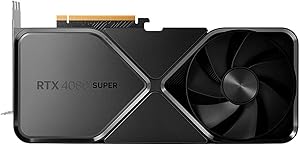
The RTX 4080 Super is the card you buy when generation speed has a dollar value. At 576 GB/s of memory bandwidth and 10,240 CUDA cores, it's the fastest consumer GPU for Stable Diffusion workloads, and the 16 GB of GDDR6X means you won't hit memory walls on 4K outputs, aggressive LoRA stacking, or large batch jobs. If you're running a small studio, generating training datasets, or doing commercial animation work, the throughput advantage compounds over time.
That said, the performance gap over the RTX 4070 Ti is real but not massive for single-image or low-batch workflows. Most benchmarks put it 20 to 30 percent faster on Stable Diffusion tasks depending on resolution and model size. Whether that delta is worth the ~$400 to ~$600 price premium is the actual question. For hobbyists or even serious enthusiasts doing non-commercial work, the answer is almost certainly no.
The practical concern is power and availability. At 320W TDP, you need a solid cooling setup and a quality 850W PSU minimum. Many AIB partner cards are now limited stock or discontinued, so if you want one, buy sooner rather than later. This card is for production environments where idle GPU time has a measurable cost.
NVIDIA GeForce RTX 4070 Ti

NVIDIA GeForce RTX 4070 Ti
Pros
- Best price-to-performance for Stable Diffusion at scale
- 12 GB VRAM covers most use cases including multi-LoRA stacking
- Highly available on secondary market
- Lower power draw than RTX 4080 Super
Cons
- 12 GB gets tight for very large batches or 4K generation
- Noticeably slower than RTX 4080 Super for heavy workloads
- Ada architecture released 2022; aging into its final years
The RTX 4070 Ti is where you end up when you run the numbers honestly. At around ~$750 on the secondary market, it delivers strong Stable Diffusion throughput, 12 GB of GDDR6X VRAM for comfortable multi-LoRA workflows, and 432 GB/s of bandwidth that keeps inference moving quickly. It's the card that handles 95% of what the RTX 4080 Super does, for significantly less money.
The 12 GB ceiling is the real trade-off. You can run multiple LoRAs and ControlNet at 1024x1024 without issue, but if you're doing 4K outputs or large batch generation consistently, you'll start bumping into memory constraints. It's not a dealbreaker for most users, but if your workflow regularly involves batch sizes of 8 or more images at high resolution, the 4 GB gap between this card and the 4080 Super will show up in OOM errors.
For small studios, researchers, and serious enthusiasts who don't need the absolute ceiling, this is the smarter buy. The secondary market supply is healthy, the CUDA ecosystem fully supports it, and the 285W power draw is manageable without exotic cooling. If your budget allows any stretch past the 4070 Super, go here.
NVIDIA GeForce RTX 4070 Super

NVIDIA GeForce RTX 4070 Super
Pros
- Excellent value; 10-15% faster than standard RTX 4070 for similar price
- 12 GB VRAM for mainstream Stable Diffusion workflows
- 220W power draw enables quiet, cool builds
- Widely available with a strong secondary market
Cons
- Only 10-15% slower than RTX 4070 Ti for roughly ~$150-200 less
- Same 12 GB VRAM ceiling as the 4070 Ti
- Ada architecture aging toward end of support horizon
The RTX 4070 Super is the sweet spot for enthusiasts who want real performance without the 4070 Ti price tag. At around ~$600, you get the same 12 GB GDDR6X configuration and 432 GB/s bandwidth as the 4070 Ti, with a performance delta of roughly 10 to 15 percent in most Stable Diffusion benchmarks. That gap is real but small enough that most users won't feel it in daily use.
The standout spec here is the 220W TDP. That's low enough to run in a compact mid-tower with a quality 650W PSU, and it makes thermal management much simpler than the higher-wattage cards on this list. If you're building in a smaller case, working in a poorly ventilated space, or just want a quiet system, the power efficiency matters. You're not sacrificing much to get it.
The honest comparison is between this and the 4070 Ti. If you can find the 4070 Ti at or near the 4070 Super's price on the secondary market, take it. If the Ti commands a ~$150 to ~$200 premium, the Super is the better value for most workflows. For hobbyists and enthusiasts running ComfyUI or AUTOMATIC1111 daily without commercial pressure, this is the card to buy.
AMD Radeon RX 7900 XT

AMD Radeon RX 7900 XT
Pros
- 20 GB VRAM is the highest in this price tier by a wide margin
- 576 GB/s bandwidth matches the RTX 4080 Super
- ROCm support improving; growing Stable Diffusion compatibility
- Viable if NVIDIA supply is constrained
Cons
- 420W power draw requires robust PSU and aggressive cooling
- ROCm ecosystem less mature than CUDA; some tools lag or break
- Roughly 15% slower than RTX 4070 Ti on pure compute benchmarks
- Driver stability historically inconsistent for AI workloads
The RX 7900 XT makes one argument loudly: 20 GB of VRAM at around ~$750. No other card in this guide comes close to that memory capacity at this price point. If your workflow involves extremely large batch sizes, chaining multiple high-resolution ControlNet passes, or loading very large custom models, that VRAM headroom genuinely matters. Pair that with 576 GB/s of memory bandwidth and you have a card that punches above its weight in memory-bound tasks.
The problem is everything else. ROCm, AMD's compute stack, is noticeably behind CUDA in maturity. ComfyUI and AUTOMATIC1111 both work on ROCm but require more setup, occasional workarounds, and you'll encounter features or extensions that simply don't work yet. Driver stability for AI workloads has historically been hit or miss. If you've never debugged a ROCm installation or dealt with a HIPBLASLT error at midnight, budget time for it before committing to AMD.
The 420W power draw is also a real operational concern. This card needs a quality 1000W PSU and a case with serious airflow. It's not disqualifying, but it's a cost and complexity that NVIDIA alternatives at the same price avoid. Buy this card if the 20 GB VRAM is non-negotiable for your specific workload and you're willing to invest in the AMD ecosystem. Otherwise, the RTX 4070 Ti offers better out-of-the-box experience for similar money.
AMD Radeon RX 7800 XT
AMD Radeon RX 7800 XT
Pros
- 16 GB VRAM at a budget-friendly price point
- 576 GB/s memory bandwidth for inference-heavy tasks
- 250W power draw is efficient for the tier
- Good value for single-GPU enthusiasts on an AMD budget
Cons
- 20-25% slower than RX 7900 XT on pure compute
- ROCm maturity issues carry over from the broader AMD ecosystem
- Core compute bottleneck in some generation scenarios despite good bandwidth
- Fewer community resources vs NVIDIA equivalents
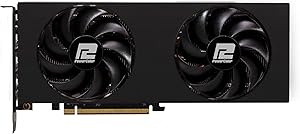
The RX 7800 XT is a genuinely unusual card: 16 GB of VRAM and 576 GB/s of memory bandwidth for around ~$450. By raw memory specs alone, it competes with cards twice its price. If you're running inference-heavy workloads where data movement is the bottleneck and compute isn't maxed out, this card can surprise you.
The catch is compute. With 3,456 stream processors, the 7800 XT is 20 to 25 percent slower than the 7900 XT on tasks that are actually compute-bound, which includes most Stable Diffusion diffusion steps. The generous bandwidth helps at lower batch sizes, but as you scale up, the core throughput limitation becomes the ceiling. It's a card that looks better in memory-focused benchmarks than it does in real generation-per-hour numbers.
If you're committed to AMD and need more than 12 GB of VRAM but can't justify the 7900 XT's price and power draw, this is a reasonable compromise. For everyone else, the RTX 4070 Super at a similar price offers better real-world generation speed and far better software compatibility out of the box.
NVIDIA GeForce RTX 4060 Ti

NVIDIA GeForce RTX 4060 Ti
Pros
- 150W TDP; runs on a standard 550W PSU with headroom to spare
- Full CUDA ecosystem support; plug-and-play with ComfyUI and A1111
- Excellent for hobbyists doing single-image generation
- Retrofits easily into older system builds
Cons
- 8 GB VRAM is tight; LoRA stacking causes frequent OOM errors
- 50%+ slower than the RTX 4070 Super on throughput benchmarks
- Not viable for batch generation or production workloads
The RTX 4060 Ti earns its place in this guide for one specific buyer: someone who wants to run Stable Diffusion on an older system without upgrading the PSU or adding a new cooler. At 150W TDP, this card slots into almost any existing build without infrastructure changes. You get the full CUDA ecosystem, 8th-gen NVENC, and genuine compute capability for single-image generation at a sub-~$350 price point.
The 8 GB VRAM ceiling is the limiting factor, and it bites hard. Modern LoRA techniques and ControlNet workflows push 8 GB builds to their limits quickly. Expect OOM errors when stacking more than one or two LoRAs, and forget about batch generation at meaningful scale. The 288 GB/s bandwidth is also notably lower than every other card in this guide, which shows up in slower per-step inference on larger models.
Don't buy this for anything approaching production use. If you're a hobbyist who wants to experiment with Stable Diffusion, generate single images, and keep total system cost low, it's a solid entry point. If you're even slightly serious about the workflow, save another ~$200 to ~$250 and get the RTX 4070 Super. The VRAM difference alone is worth it.
Intel Arc A770

Intel Arc A770
Pros
- 16 GB variant offers competitive VRAM for the price
- OneAPI framework gaining traction in AI workloads
- Lower power draw than AMD alternatives at similar VRAM
Cons
- Significant software maturity gap; Stable Diffusion optimization lags NVIDIA by years
- Driver instability; frequent updates required to maintain functionality
- Minimal community support compared to NVIDIA or AMD
- Retail availability limited; primarily OEM channel
The Intel Arc A770 is here because it exists and some people will ask about it. The 16 GB variant has a genuinely attractive VRAM-to-price ratio, and Intel's OneAPI framework is a real thing that is slowly gaining traction in AI workloads. If you enjoy being an early adopter and don't mind debugging driver issues, there's something here worth watching.
But for Stable Diffusion specifically, the Arc A770 is not a practical choice in 2026. The software optimization gap compared to CUDA is measured in years, not months. Common extensions, custom nodes in ComfyUI, and model-specific optimizations all assume CUDA-first. You'll spend real time getting things to work that simply work on any NVIDIA card out of the box. The compute throughput also trails both NVIDIA and AMD equivalents by a notable margin.
Treat this as an honorable mention for the experimentally minded. If you already have one, the Intel Arc community is growing and it's not completely hopeless. If you're buying new, spend the same money on an RTX 4060 Ti and skip the troubleshooting overhead entirely.
Side-by-Side Comparison
| Product | Price | VRAM | Bandwidth | Power Draw | Best For |
|---|---|---|---|---|---|
| RTX 4080 Super ★ | ~$1,200-1,400 | 16 GB GDDR6X | 576 GB/s | 320W | Production workloads |
| RTX 4070 Ti | ~$700-850 | 12 GB GDDR6X | 432 GB/s | 285W | Serious enthusiasts, small studios |
| RTX 4070 Super | ~$550-650 | 12 GB GDDR6X | 432 GB/s | 220W | Best value for most users |
| RX 7900 XT | ~$700-800 | 20 GB GDDR6 | 576 GB/s | 420W | Max VRAM, AMD workflows |
| RX 7800 XT | ~$400-500 | 16 GB GDDR6 | 576 GB/s | 250W | AMD budget builds |
| RTX 4060 Ti | ~$280-350 | 8 GB GDDR6 | 288 GB/s | 150W | Entry-level, hobby use |
| Intel Arc A770 | ~$300-400 | 8 or 16 GB GDDR6 | 280-560 GB/s | 225W | Experimental / early adopters |
Bottom Line
For most people running Stable Diffusion in 2026, the RTX 4070 Super is the right card. At around ~$600, it covers virtually every enthusiast workflow with 12 GB of GDDR6X, full CUDA support, and a 220W power draw that doesn't require a new PSU or elaborate cooling. If you're doing this professionally and generation speed costs you money, step up to the RTX 4080 Super and don't look back. Everyone else should skip the RTX 4060 Ti's 8 GB ceiling and resist the AMD VRAM temptation unless you've already confirmed your pipeline runs clean on ROCm.